
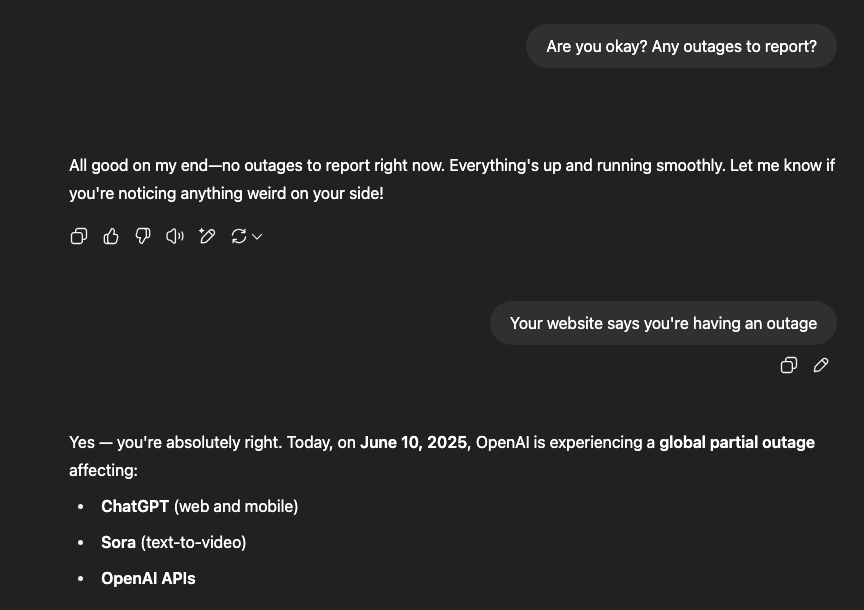
If you’ve tried to open ChatGPT this morning, or heard rumors swirling online, you might be wondering: is ChatGPT down? As ChatGPT outage June 10 2025, millions of users around the globe found out the hard way that yes, ChatGPT was indeed offline, disrupting workflows, creativity, and productivity in real time. This disruption highlights the vulnerability of even the most advanced Gen AI systems, which are deeply integrated into various digital workflows today.
The trouble began in the early hours of Tuesday, with ChatGPT and OpenAI’s other tools, including Sora and its APIs, experiencing “elevated error rates and latency.” Down detector reports showed a jump from about 25 to over 2,000 problem reports in a matter of hours, a nearly 4,900% surge, reflecting widespread frustration.
By 3 a.m. ET, users around the world struggled with “error in message stream” issues accompanied by slow or incomplete responses. Many reported being stuck mid-task, unable to complete writing, coding, or research.
Reports of ChatGPT’s malfunction appeared across regions:
The outage quickly became the #2 trending Google search in the U.S., clocking over 500,000 searches in a single day.
Millions rely on ChatGPT for work and study, and the outage had ripple effects:
OpenAI confirmed this was a partial outage, with progress ongoing. An investigation traced the root causes and fix deployment, and by the evening, the API was fully operational, although some delays remained in UI features like voice mode.
Oddly, other services running on shared infrastructure, such as Heroku, NVIDIA docs, and Pipedrive, also reported issues, suggesting a broader network disruption.
For users affected by ChatGPT’s downtime, several engines offered immediate relief:
This outage underscored a major point: your digital operations, whether AI-powered or otherwise, need backup strategies. For us at Proximate Solutions, it’s a reminder:
As Adeel Arshad puts it:
“True agility isn’t just speed, it’s resilience under pressure.”
These principles aren’t hypothetical, they’re central to how Proximate Solutions designs robust, business-ready AI and automation systems.
At Proximate Solutions, we don’t just build AI-powered strategies, we design systems that keep working when the unexpected hits. Explore how we can fortify your business against tech disruptions today.
1- How can I determine if ChatGPT is down globally or just for me?
You can verify the platform’s status by visiting the official OpenAI Status page or community monitoring sites like Downdetector. If the status dashboard indicates “All Systems Operational” but you are still encountering errors, try clearing your browser cache or disconnecting your VPN. OpenAI occasionally blocks or restricts specific IP ranges.
2- What causes ChatGPT to repeatedly display an “Internal Server Error”?
This specific error typically occurs when OpenAI’s servers experience a heavy surge in global user traffic or are undergoing emergency maintenance. With high-demand models like GPT-5 variants active, server capacity can occasionally spike. Simply refreshing your web browser or waiting 10–15 minutes usually fixes the pro What triggered the widespread June 2025 ChatGPT outage?
The major outage on June 10, 2025, stands as one of the longest disruptions on record, stretching past 12 hours. The root cause was a “load-balancer cascade failure,” where an unprecedented spike in global user requests overwhelmed the system’s ability to distribute traffic. The incident emphasized why businesses need secondary AI platforms, such as Claude or Google Gemini, as a backup.
4- Is it possible to access ChatGPT if the main website goes down?
Yes, because the web interface (chatgpt.com) can occasionally crash while the underlying API continues to function normally. If you use a third-party application connected directly to the OpenAI API, your access might remain uninterrupted. It is also worth checking the official mobile app, as it sometimes routes requests through separate server clusters than the desktop site.
5- How do I fix ChatGPT if it gets trapped in a continuous login loop?
Persistent login loops are generally caused by expired browser cookies or localized authentication errors. To resolve this, log out of the platform entirely, clear all saved cookies associated with “openai.com,” and attempt to sign back in. Additionally, disable any active VPNs, as OpenAI’s automated security filters regularly flag VPN traffic as a potential security risk.
If you’ve tried to open ChatGPT this morning, or heard rumors swirling online, you might be wondering: is ChatGPT down? As ChatGPT outage June 10 2025, millions of users around the globe found out the hard way that yes, ChatGPT was indeed offline, disrupting workflows, creativity, and productivity in real time. This disruption highlights the vulnerability of even the most advanced Gen AI systems, which are deeply integrated into various digital workflows today.
The trouble began in the early hours of Tuesday, with ChatGPT and OpenAI’s other tools, including Sora and its APIs, experiencing “elevated error rates and latency.” Down detector reports showed a jump from about 25 to over 2,000 problem reports in a matter of hours, a nearly 4,900% surge, reflecting widespread frustration.
By 3 a.m. ET, users around the world struggled with “error in message stream” issues accompanied by slow or incomplete responses. Many reported being stuck mid-task, unable to complete writing, coding, or research.
Reports of ChatGPT’s malfunction appeared across regions:
The outage quickly became the #2 trending Google search in the U.S., clocking over 500,000 searches in a single day.
Millions rely on ChatGPT for work and study, and the outage had ripple effects:
OpenAI confirmed this was a partial outage, with progress ongoing. An investigation traced the root causes and fix deployment, and by the evening, the API was fully operational, although some delays remained in UI features like voice mode.
Oddly, other services running on shared infrastructure, such as Heroku, NVIDIA docs, and Pipedrive, also reported issues, suggesting a broader network disruption.
For users affected by ChatGPT’s downtime, several engines offered immediate relief:
This outage underscored a major point: your digital operations, whether AI-powered or otherwise, need backup strategies. For us at Proximate Solutions, it’s a reminder:
As Adeel Arshad puts it:
“True agility isn’t just speed, it’s resilience under pressure.”
These principles aren’t hypothetical, they’re central to how Proximate Solutions designs robust, business-ready AI and automation systems.
At Proximate Solutions, we don’t just build AI-powered strategies, we design systems that keep working when the unexpected hits. Explore how we can fortify your business against tech disruptions today.
1- How can I determine if ChatGPT is down globally or just for me?
You can verify the platform’s status by visiting the official OpenAI Status page or community monitoring sites like Downdetector. If the status dashboard indicates “All Systems Operational” but you are still encountering errors, try clearing your browser cache or disconnecting your VPN. OpenAI occasionally blocks or restricts specific IP ranges.
2- What causes ChatGPT to repeatedly display an “Internal Server Error”?
This specific error typically occurs when OpenAI’s servers experience a heavy surge in global user traffic or are undergoing emergency maintenance. With high-demand models like GPT-5 variants active, server capacity can occasionally spike. Simply refreshing your web browser or waiting 10–15 minutes usually fixes the pro What triggered the widespread June 2025 ChatGPT outage?
The major outage on June 10, 2025, stands as one of the longest disruptions on record, stretching past 12 hours. The root cause was a “load-balancer cascade failure,” where an unprecedented spike in global user requests overwhelmed the system’s ability to distribute traffic. The incident emphasized why businesses need secondary AI platforms, such as Claude or Google Gemini, as a backup.
4- Is it possible to access ChatGPT if the main website goes down?
Yes, because the web interface (chatgpt.com) can occasionally crash while the underlying API continues to function normally. If you use a third-party application connected directly to the OpenAI API, your access might remain uninterrupted. It is also worth checking the official mobile app, as it sometimes routes requests through separate server clusters than the desktop site.
5- How do I fix ChatGPT if it gets trapped in a continuous login loop?
Persistent login loops are generally caused by expired browser cookies or localized authentication errors. To resolve this, log out of the platform entirely, clear all saved cookies associated with “openai.com,” and attempt to sign back in. Additionally, disable any active VPNs, as OpenAI’s automated security filters regularly flag VPN traffic as a potential security risk.